Order and returns support
Answer tracking, returns and delivery questions instantly.
Can I return this if it doesn’t fit?
Give every customer an instant, accurate answer — trained on your own content, available on your website and apps, and backed by your support team.
Deploy IntellyMind Chat on
WHY INTELLYMIND CHAT
Upload documents, add web pages and PDFs, and write custom answers for important questions. IntellyMind Chat replies from the knowledge you approve — not guesswork.
When a conversation needs judgement or reassurance, Live Chat brings in your team with the full history — so customers never have to repeat themselves.
Automate the steps that follow a conversation — looking up orders, creating tickets or notifying the right team — and keep humans in control of sensitive actions.
See what customers ask most, where answers fall short and which topics need new content — then improve your agent with each review.
PRODUCT PREVIEW
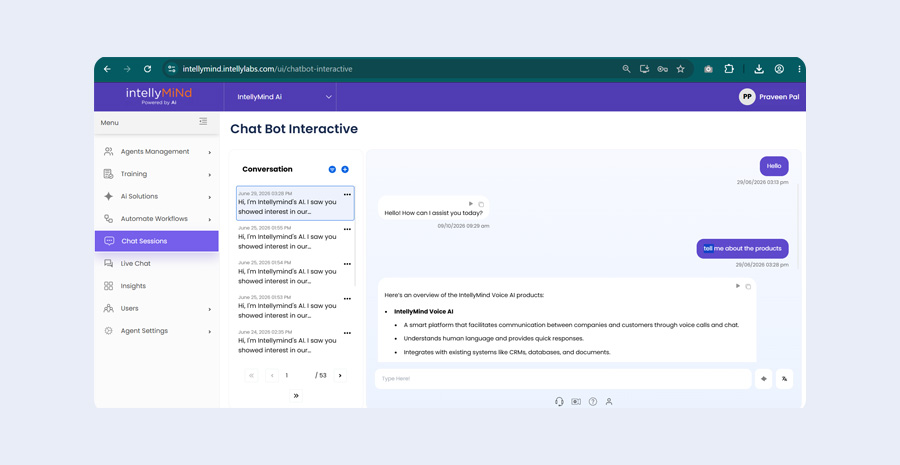
Watch a short preview of the IntellyMind Chat experience — from a customer’s first question to a helpful, grounded answer.
HOW IT WORKS
Upload documents, link web pages and write custom answers for key questions.
Choose the chatbot image, welcome messages, workflows and handoff rules.
Embed on your website or app, then review sessions and insights to improve.
USE CASES
Answer tracking, returns and delivery questions instantly.
Can I return this if it doesn’t fit?
Explain products, eligibility and documents step by step.
Am I eligible for a personal loan?
Help new users find features and fix common issues.
How do I invite my team?
Share clinic details, timings and preparation guidance.
What are your weekend timings?
Answer course, fee and application questions.
When does the next intake start?
Make HR and IT policies easy to find.
How do I reset my VPN password?
FAQ
Everything teams usually ask before a chat demo.
On your website and apps, with other digital channels discussed during your demo based on your requirements.
You add knowledge sources such as documents, PDFs, FAQs and web pages, plus custom answers for important questions.
You decide. The assistant can say it doesn’t know, collect details, or hand the conversation to your team through Live Chat.
Workflow automation and APIs allow integration with tools such as CRMs and helpdesks. We confirm integration requirements during discovery.
SEE IT WITH YOUR USE CASE
Bring your top customer questions and a few support documents — we will show you the experience with your content.
Tell us the questions, channels and systems you want to cover.
We walk through IntellyMind with content close to your own.
Agree knowledge sources, handoff rules and success measures.